Showing posts with label Fix-It Friday. Show all posts

Friday, February 12, 2010

I Heart Faces - Fix it Friday

I so needed a baby fix today... so I was so happy to see a gorgeous baby as an edit! Some days I just really want to have a baby in the house again... mine is already two! So sad!

My prego sister was over today... and I convinced her to drink 2 tbs of castor oil... lets see if it works on her cause it worked on me with the twins! So here is my edit... Good ol Black and White with Selective colored eyes... easy, breezy, quick and done! To see other great edits to go http://www.heartfaces.com/

And guess what I got in the mail today... I received my Photoshop CS2!! It was Christmas morning for me! And yes I know I am not as cool as you others with the CS4... but hey.. it was affordable.... AND much better then elements... :D I can't wait to use it! Good ol Ebay... as long as you are careful... you can never go wrong!

And here is the original

Friday, January 8, 2010

Fix-It Friday #40 - Hands-On Photo Editing Fun!


In celebration of http://www.iheartfaces.com/ birthdaythis month we had to photo edit a birthday photo.

To be honest... this photo "I thought" didn't need editing... so I just played with it a little! So in honor of I Heart Faces Birthday and the Victory of Boise State Bronco's Fiesta Bowl win on Monday... here is my contribution to the photo!

What I did:
1) Rotated, Cropped and sharpened photo with photoshop 7
2) Replaced colors with photoshop 7
3) Cross Processing using Nik Color Effex
4) Vigenette Blur using Nik Color Effex and delted any blur around the boy and the table to draw attention to him and not the subjects behind him
5) Slight Glamour glow with Nik Color Effex


AFTER

(P.S. Go Broncos! the only other undefeated team this year besides Alambam the National Champions!)

P.S.S. Sorry Amy the Longhorns didn't win... but I did root for them the whole game!! And they almost made a comback!

Before

Friday, August 28, 2009

Fix-It Friday #26 - Hands-On Photo Editing Fun!

Isn't this little girl just absolutely darling! I love her beauitful princess dress and her expression. The brick wall is perfect for this picture. What a great picture. Here are my edits.
Each of my edits were very simple. Here is what i did on all the images
1) Sharpened the image in Photoshop
2) Straightened the image in Photoshop
3) Used a clipping mask in Photoshop
4) Adjusted the tonal contrast on the brick only using Nik software
5) Added font using Photoshop


For this image only I did a gold reflector filter and a glamour glow using Nik Software
Here I did a paper toner filter and brought out the colors on her dress and the flower only using Nik Software
Using photoshop I adjusted the levels and then did a gradient tool to darken the colors on the brick but keep her bright and then adjusted the contrast to make her pop in the photo.

All I did on this one was use a gold reflector filter using Nik Software
Here is the original photo.

Friday, August 14, 2009

Fix-It Friday #24 - Hands-On Photo Editing Fun!

Today is fix it friday at http://www.iheartfaces.com/

I didn't participate last week as I was really busy and forgot about it! And today I am very busy again but took a few minutes to do a few quick edits. My son left with grandma for the coast today for 5 days and my husband also left out of town for work. So I am down two in the household... but lots of clean up from packing to get done!

Here are the few edits I did this morning. HAPPY FRIDAY!

Run down of what I did

1) Sharpened photo using CS4
2) Adjusted Brightness and Contrast Using CS4
3) Adjusted Color Using CS4
4) Brightened the eyes using CS4 put in separate layer to keep the selective coloring
5) Cloned the spots of her face (food and dry skin around lips) Using CS4
6) Used a Dynamic Skin Softner (Using Nik Software)
7) Used a Gold REflector Filter (Using Nik Software)
8) Used a White Neutralizer to adjust the coloring in the photo (Using Nik Software)
9) Used a Viginette Blur FIlter (Using Nik Software)
10) Used a paper Toner Filter for the B&W (Using Nik Software)


Same photo as above minus Step 9 & 10
Here is the original photo
ENJOY!

Friday, July 31, 2009

Fix-It Friday #22 - Hands-On Photo Editing! "Sourthern Belle"

This week I am going to do some quick and simple fixes. I love this photo. The girl, thedress, the old stone stairs, the red house in the background, the foilage. All of it just seems to go so wonderfully with this photo. I thought instead of doing editing this week I would apply some quick filters.

I have this amazing software called Nik Color Efex Complete. It comes with over 50 filters and it is absolutely incredible. I have talked about it before and it is worth the $350.00 it costs to buy it. BTW: I like it better then photoshop for quick edits!

So all I did on this photo was apply some filters that are built into this software. Nothing fancy, nothing hard... just quick and simple edits. I will list the filter I used but other then that I did nothing. '

Here is the original photo
Monday Morning (Sephia) Filter
Gold Reflector Filter

Viginette Blur Filter
Old Photo Filter
Midnight Filter
Glamour Glow Filter
Indian Summer Filter

Friday, July 17, 2009

Fix-It #20 - Hands-On Photo Editing!

Today is my favorite day of the week... I love Fix it Friday at http://www.iheartfaces.com/


Just look at this darling little girl... I hate when you take adorable pictures like this and then you see feet in the background... and that happens quite often with little kids.


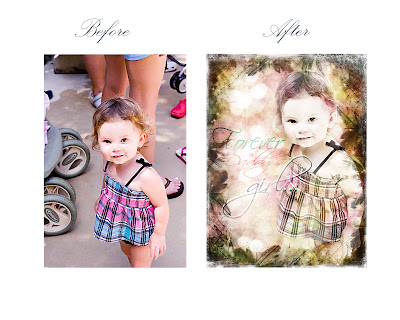
Since I am in the middle of a texture, font and frame class I thought it appropriate to bring that into this photo.


Here were my steps


USING PHOTOSHOP 7.0 instead of 2.0 (Yeah so excited! I am moving up in this world!)

1) Adjusted Sharpness
2) Removed boo boo's off her knuckles
3) Used the lasso tool to remove the little girl and then removed any other distractions from photo
4) Used my antique preset to make her look vintage

5) Hand painted blush around her cheeks and then added a little green to her eyes using soft light overlay

6) Applied 4 different textures

7) Applied a frame around edge

8) Added font


My Edit

ORIGINAL

Hope you all have a great weekend!

Friday, July 3, 2009

Fix-It #19 - Hands-On Photo Editing!

Yeah it is fix it friday at http://iheartfaces.blogspot.com/! Since I don't have any of my own photos to edit these days I may as well edit others! I cannot find the time to take photos or the desire (mostly!)

Here are my edits
1) Sharpened the photo
2) Enhanced Eyes
3) Adjusted the contrast
4) Slight glamour glow and softened skin tones
5) turned to black and white with pop of "pink"
6) Did a vigenette blur around outside
7) Cropped photo
8) Added a card with her name


The second I did a little black and white with pink (Same photo as above minus the glamour glow)

Same photo as before only no black and white effect


Here is the original photo.

Friday, June 26, 2009

Fix-It #18 - Hands-On Photo Editing!

It's Fix it Friday at http://iheartfaces.blogspot.com/

This picture is of this adorable little boy with a sad little tear running down his face! Oh I just love it!

Here is my edit.

What I did

1) Sharpened the picture

2) Enhanced his eyes

3) Slight glamour glow

4) Removed the background

5) Added a texture

6) Added a poem

Here is the original photo. Isn't he a doll?


Friday, June 19, 2009

Fix-It #17 - Hands-On Photo Editing!


It is Fix it Friday at http://iheartfaces.blogspot.com/.

This is one of my favorite days. I love photo editing... I think it is one of my favorite things about photography because it is your chance to be creative and artistic!

I have seen this beautiful family many times at I Heart Faces. To visit this wonderful family click here http://thestanleyclan.blogspot.com/. There little girl is so adorable and I love seeing her every week in the I Heart Faces photo contests.

Here is my edit... and yes I know I am so boring because I add glamour glow to all photos of little girls. I guess it is just my thing!

MY EDIT

What did I do


The lighting was already pretty good on the photo so I left that alone


1) I enhanced her eyes


2) Adjusted the contrast


3) Reduced the noise in the photo


4) Added glamour Glow and reduced the saturation


5) Added a frame and a border


That's pretty much it. I used Photoshop Elements 2.0 ( I know so old school) and I also used Nik Color Efex Software for filtering.


ORIGINAL PHOTO


Let me know what you think! Have a great day everyone! Happy Friday!

Friday, June 5, 2009

Fix-It Friday #16 - Hands-On Photo Editing!

To see more edits click here http://iheartfaces.blogspot.com/

Here is my edit...

Here is the original

Friday, May 29, 2009

Fix-It Friday #15 - Hands-On Photo Editing!

It's fix it friday! To see more fix it's visit here at http://iheartfaces.blogspot.com/ This photo was fun to work with! She sure is a cute little girl!

Here is my edit in color. I enhanced the eyes, did a skin softener, and also a glamour glow. I also did a few other things but those were the main edits.
I took the upper photo and turned it to black and white. Then I brought out the color in her shirt, hair piece and eyes.
This is a copy of the original photo.

Friday, May 22, 2009

Fix-It Friday #14 - Hands-On Photo Editing!

Today is Fix it Friday at http://iheartfaces.blogspot.com/. This picture was submitted by Rambunctious Joy (click here to see her site and her beautiful daughter Alexandra.

I wasn't quite sure what I was going to do with this picture but after playing for a little bit this is what I came up with.

I hope mom doesn't care that I changed her eye color. She had these beautiful brown eyes but after turning the photo to black and white I really wanted them to pop. So I guess her mom will finally get to see what her already adorable child will look like with green eyes!
Thanks for looking!


AFTER


BEFORE

blogging buddies